Mainly, there are two cases exist when you need to integrate a Google account with your Android smartphone. First, when you have purchased a new Android handset and secondly, after resetting your smartphone settings. So, once you have successfully integrated a Gmail account on your smartphone, it immediately start syncing all your data on the Google servers such as App data, Contacts, Google Plus, Photos, Chrome, etc.
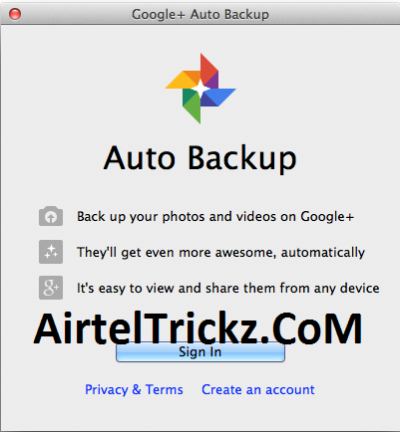 Basically, the syncing is a background process that runs without affecting any of your smartphone settings. No doubt that your data is absolutely safe with the Google and it has lots of advantages too. Nevertheless, if you are concerned with any of your personal or important stuff and don’t want to share with the Google, then you can go for specific things that you want to sync. But make sure that when you choose Google Plus or Photos option, then it not only sync with the Google Servers but also create an Auto Backup Folder in Gallery on your Smartphone. Definitely, it will use your internal storage.
Well, the most disgusting thing is that you can’t delete Auto Backup Folder in Gallery via normal fashion. So, here is an easy trick to delete Auto Backup Folder in Gallery on Android Smartphone.
How to Delete Auto Backup Folder in Gallery on Android:
Step 1: Pick up your smartphone and navigate to:
- For Lollipop version, go to “Settings > Accounts > Google”.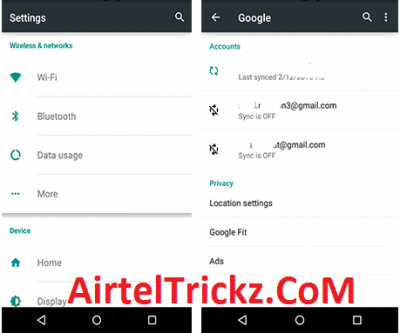
- For KitKat version, go to “Settings > Google”.
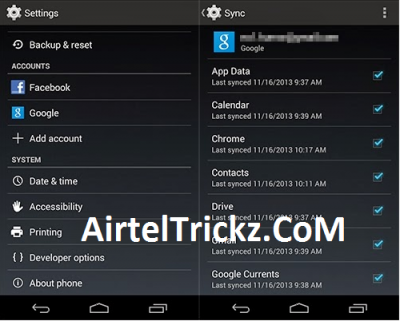
Step 2: Once you have reached at the above specified destination, then click on “REMOVE ACCOUNT” button.
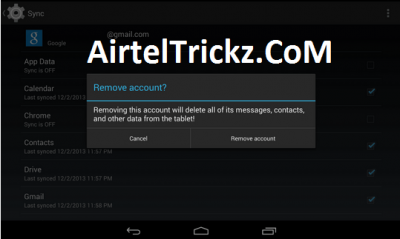 Note:
Note: Removing the account will delete all of the messages, contacts, and other data from your smartphone associated with it.
Step 3: Now, go to “Gallery” and verify that Auto Backup Folder is deleted or not. If not, then delete it.
Note: In most of the cases, restarting the smartphone solves the issue.
Step 4: Once again, integrate your Gmail account on your smartphone and make sure that you don’t check “Google Photos” under sync menu.
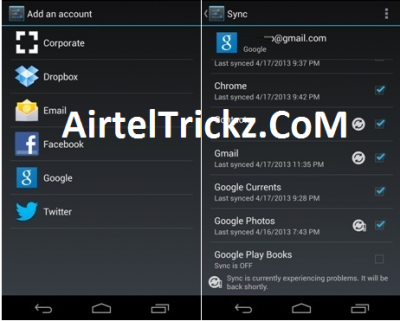
That’s it! Your problem has been solved and you will never see Auto Backup Folder in Gallery. In this way, you can delete Picasa album too
 UC Browser, Faster Download! Click Here!
airtel 3g trick 2015, android, aircel trick vodafone free net tricks bsnl 3g tricks fileice survey bypass tricks reliance trick free recharge tricks idea UDP trick paytm mobikwik coupons discounts freecharge free recharge android apps, Free recharge tricks, premium accounts , pd proxy, finchvpn trick, 50rs 100rs cashback , check your own number operators , networks tricks, Unlimited Free Recharge Trick (2015) , Paytm Pay 5 Get 10 Cashback [Latest], IDEA 3G UDP Trick, TCP Tricks , Airtel 3G UDP Trick AirTel 3G Free Internet Vpn Trick Vodafone 3G Vpn Free Premium Internet Trick, Missing Tricks - The Tech Zone , Free Recharge Free Gprs Aircel Airtel Bsnl Idea Reliance Vodafone Hot Deals Amazon Ebay Paytm Android Tricks WhatsApp Tricks Facebook Tricks , sms tricks , calling tricks , facebook hacking tricks Watch IPL 2014 Live Streaming Online Free,Watch IPL 2015 Match Live on Mobile ,Indian Premier League 2015 (IPL 8) Live Cricket Stream Online Free,High Quality IPL Streaming, IPL 2015 Live Streaming Season 8 on Set Max TV Channel. Watch Live IPL Streaming Free broadcast Video,Full IPL 2015 Matches Free Online Watch IPL 2015 Live Streaming Online Free,Watch IPL 2015 Match Live on Mobile ,Indian Premier League 2015 (IPL 8) Live Cricket Stream Online Free,High Quality IPL Streaming, IPL 2015 Live Streaming Season 8 on Set Max TV Channel. Watch Live IPL Streaming Free broadcast Video,Full IPL 2015 Matches Free Online